
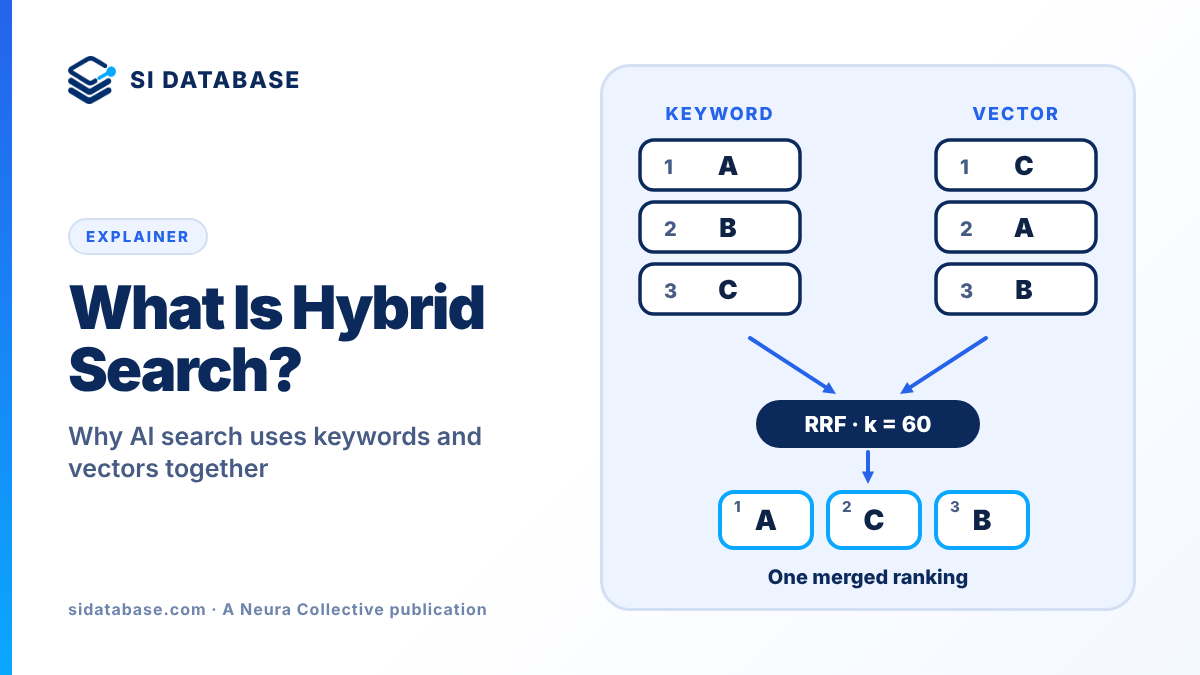
Hybrid search runs two searches on the same question, one that matches words and one that matches meaning, then merges the two ranked lists into a single set of results. Each method can find things the other misses, so the combination can cover more ground than either alone.
Here is an invented example. A support team searches its help center for “error E-4012 after updating my card.” A keyword search finds the article that names E-4012, because the code appears in the text. A vector search finds articles about payment failures after a card change, including ones that never mention the code. The best answer might be in either list, so the system needs both.
Our earlier article on why intelligent search still needs exact words explains why both kinds of search matter. This article addresses the next question: how the system merges two lists that were scored differently.
Two searches, two kinds of score
Many search engines rank keyword matches using a method called BM25, which scores documents based on how often the query’s terms appear and how distinctive those terms are. Vector search compares numerical representations of meaning, as described in our guide to vector embeddings.
Microsoft’s Azure AI Search documentation says hybrid search “runs full-text search and vector search in parallel,” and that “an RRF algorithm merges the results,” returning one result set. The merge is the hard part, because the scores do not share a scale. Microsoft’s documentation states: “Each algorithm has its own range and magnitude.” It lists BM25 scores as having no upper limit. In Azure AI Search, transformed cosine-based vector @search.score values range from about 0.333 to 1.00; these are not raw cosine-similarity values. A BM25 score of 14.2 and a vector score of 0.82 cannot be added fairly.
Merging by rank
Reciprocal rank fusion, or RRF, sidesteps the problem by ignoring raw scores. It uses only the position of each document in each list. For every list that contains a document, the document earns 1 / (rank + k) points, and the points are added up. The constant k is 60 in Elasticsearch’s default settings, and Microsoft’s documentation states that experiments show the algorithm performs best with a small value, such as 60. The method comes from a 2009 conference paper by Gordon Cormack, Charles Clarke, and Stefan Buettcher.
Here is a worked example with three documents and k = 60.
Swipe or scroll horizontally to read the full table.
| Document | Keyword rank | Vector rank | Keyword points | Vector points | Total |
|---|---|---|---|---|---|
| A | 1 | 2 | 0.01639 | 0.01613 | 0.03252 |
| B | 2 | 3 | 0.01613 | 0.01587 | 0.03200 |
| C | 3 | 1 | 0.01587 | 0.01639 | 0.03227 |
The final order is A, then C, then B. Document C won the vector list and still finished second because A ranked high in both lists. RRF rewards agreement. A document that appears in only one list earns points from that list alone.
RRF avoids the need to calibrate raw scores from independent systems onto one scale. Its rank constant and the number of candidates taken from each list can still affect the result. The trade-off is that RRF ignores how far apart the scores were. A document that beat the runner-up by a wide margin gets the same credit as one that won by a hair.
Merging by score
The alternative is to normalize the scores first. Weaviate’s documentation describes a method called relative score fusion: in each list, the highest score becomes 1, the lowest becomes 0, and the rest fall in between. The system then adds the two normalized scores using a weight called alpha. At alpha = 0, only keyword search counts; at alpha = 1, only vector search counts; at 0.5, the two count equally. Weaviate’s server default is 0.75, and its documentation warns that client libraries may not use that default, so the weight should be set explicitly when it matters.
Azure AI Search lets a team weight individual vector queries. A weight of 0.5 reduces a query’s influence in the combined ranking, and a weight of 2.0 increases it.
Which method is better depends on the data. Weaviate’s engineers reported that relative score fusion improved recall by about 6 percent over rank-based fusion on one dataset, FIQA, in their own tests. That is one vendor’s result on one dataset, and it is a reason to test, not a rule.
What else shapes the results
- Filters. A hybrid query can also apply conditions such as location, date, or category. Azure’s documentation says the filter can run before or after vector retrieval and advises testing to see which works better for a given workload.
- Sorting. Azure warns that an explicit sort order overrides relevance ranking, so a team that wants relevance should leave sorting out.
- Reranking. Azure can apply a separate semantic ranker after fusion and reports that ranker’s score separately from the fused score.
How to judge a hybrid setup
Build a small test set from real questions. Include queries with exact identifiers, such as product codes and names, and queries phrased in ways that share no words with the answer. Run keyword search alone, vector search alone, and the hybrid, then compare where the right result lands. A hybrid system that wins on average can still fail on the one query type your users care about most. Our checklist for choosing a vector database includes questions to ask before you commit.
Hybrid search matters most in applications that retrieve text for an AI model to read. If the retrieval step misses the right passage, the model has nothing correct to draw on, which is the failure our explanation of retrieval-augmented generation describes. Some database platforms, such as the one in our Weaviate profile, offer hybrid search as a built-in feature.
Sources and further reading
- Microsoft Learn, Hybrid search using vectors and full text in Azure AI Search: parallel execution, RRF merging, filters, and sorting.
- Microsoft Learn, Relevance scoring in hybrid search using Reciprocal Rank Fusion: the RRF formula, score ranges, and query weights.
- Microsoft Learn, Relevance in vector search: the transformation from cosine distance to Azure search scores.
- Elasticsearch Reference 8.19, Reciprocal rank fusion: the formula, the default constant of 60, and window size.
- Weaviate documentation, Hybrid search: fusion methods and the alpha parameter.
- Weaviate blog, Unlocking the Power of Hybrid Search: A Deep Dive into Weaviate’s Fusion Algorithms: how ranked and relative score fusion work, with the vendor’s recall comparison.
- Cormack, Clarke, and Buettcher, Reciprocal rank fusion outperforms Condorcet and individual rank learning methods (SIGIR 2009): the original paper’s record.
Read next
Know someone who would find this useful?
Share it with a colleague or post it where your team talks about data.

The Data Behind AI
A 48-page illustrated guide to databases, search, and intelligent systems. No coding required.
Explore the book →